
Your inquiry form
Your inquiry form lets couples and hosts tell you about their celebration. Each inquiry lands in your Pipeline, and GildLuxe records where it came from.
Who can do this
Owners and managers can turn the form on and change it. Sales can see its settings.
Before you start
- Your inquiry form is off until you turn it on. While it's off, anyone who opens it is told you're not taking inquiries there, with your email or phone if you've set them.
- Load your event types in Event setup, so visitors can choose one (see Event setup).
Turn it on
- In Settings, find Inquiry form and click Edit.
- Tick Take inquiries through your form.
- Optionally write an Intro line (up to 200 characters), shown under the heading, and a Thank-you message (up to 300 characters), shown after someone sends an inquiry and in the email they get.
- Click Save inquiry form.
Share your links
Under Your form's links, each link records where a lead came from, so your Pipeline statistics show which links bring the most inquiries. Click Copy next to one, then paste it where you want it:
- Instagram bio, Instagram stories and Instagram posts: inquiries are recorded as from Instagram.
- Your website: recorded as from your website.
- Anywhere else: the form asks the visitor how they heard about you.
What visitors fill in
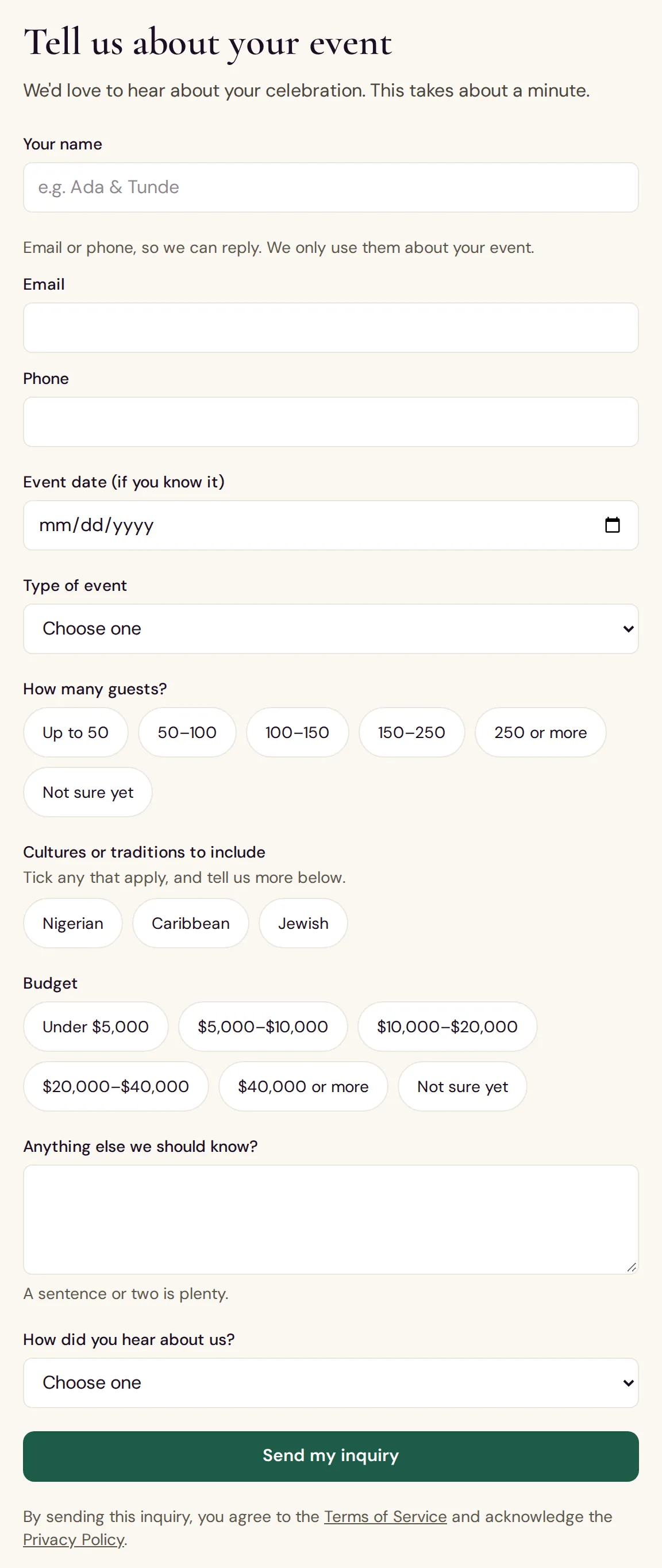
Your name (required), an Email or Phone (one of them is required), the Event date (if you know it), the Type of event, How many guests?, any Cultures or traditions to include, a Budget range, Anything else we should know?, and (when they didn't come through one of your links) How did you hear about us? They click Send my inquiry, and see your thank-you message.
Where inquiries go
Each inquiry appears in your Pipeline at Inquiry, with its source and a task to reply by the next business day. If its email or phone matches another open lead, it's marked Possible duplicate.
Who gets emailed
- Every owner and manager, at the email they sign in with, when an inquiry arrives. The email is called New inquiry and links to the lead.
- The visitor, a copy with your thank-you message, from your business name via GildLuxe. Replies come to your business email. It only goes to visitors who gave an email, and only once a day for the same address.
What you'll see when it worked
On the Inquiry form card, Taking inquiries says On, and new inquiries appear in your Pipeline.
If something goes wrong
| What you see | What to do |
|---|---|
| Visitors see that you're not taking inquiries there right now | The form is off. Tick Take inquiries through your form and save. |
| A message to keep the intro line under 200 characters | Shorten the intro line. |
| Visitors are told you've received a lot of inquiries from there | The form limits how many inquiries one visitor can send in an hour. They can try again in an hour, or contact you directly. |
Be careful
- Turning the form off also affects your business page and guest QR codes: visitors will only see your contact details.