
Services and pricing on an event
Build what the client is buying on the event's Services tab: packages, extra lines, choices between options, discounts and vendors. GildLuxe works out the charges, taxes and total.
Who can do this
- Owners, managers and sales can add packages and lines, choose options and assign vendors.
- Sales discounts are capped by the Sales discount limit in Settings (it starts at 10% of the subtotal). Larger discounts need an owner or manager.
- Only owners and managers can change a line's cost, this event's charges, or waive the minimum spend.
- Costs and margins show only to owners and managers, and to sales if an owner allows it.
Before you start
- Add your packages first (see Packages: the services you sell).
- Enter both tax rates in Settings. Until then GildLuxe can't show totals, and says Enter the sales and alcohol tax rates in Settings to price this event.
Add a package
- Open the event and click the Services tab.
- Choose a package from the list and click Add package.
The event gets its own copy of the package, with its tasks, quality checks and risks.
Add a line of your own
- Click Add a line.
- Choose how it's Priced: Flat, Per guest, Per table, Per item, Percent of other lines, Discount, fixed amount, or Discount, percent.
- Give it a name and category, and the price (or the percent or amount off).
- To offer the client a choice, such as fresh or silk centerpieces, give each option line the same Option group (optional) name.
- Click Add.
Options, edits and removals
- In an option group, click Choose on the option the client picked. Until something is chosen, totals use the lowest-priced option.
- Click Edit to change a line and Save line to keep it.
- Click Remove, then Yes, remove. It also removes the line's open tasks and quality checks; done tasks stay.
Vendors on a line
- Click Choose vendor on a line.
- Choose the Vendor, and a Backup if you have one.
- Click Save vendors.
How prices are worked out
- While you're quoting, prices show as ranges, using the guest estimate and any "up to" price.
- Per-table lines use guests divided by Seats per table. Once booked, you can set the Number of tables (optional) instead and click Save tables.
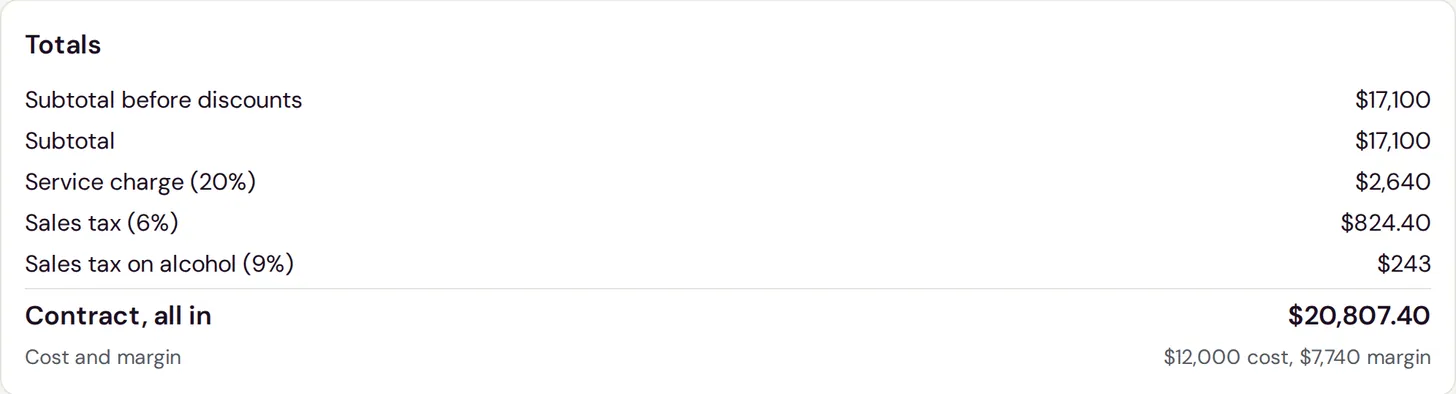
- Totals shows the subtotal, discounts, any minimum spend adjustment, the service charge, sales taxes, gratuity and the total: Quote, all in while quoting, Contract, all in once booked.
This event's charges (owners and managers)
Under Charges for this event, you can set a different Service charge (%) or Gratuity (%) for this event, or mark it Tax exempt. Leave a rate blank to use your business rate. Click Save charges.
If the event is under your minimum spend, the difference is added as an adjustment. Click Waive the minimum to drop it for this event, and Apply the minimum again to bring it back.
When the event is booked
The event keeps a copy of your business's rates as they were when it was booked. Changing your rates in Settings later doesn't change it. An owner or manager can click Apply current rates on the event, then Yes, apply current rates, to move it to your new rates. The client then needs to agree to the new total.
Who gets emailed
Each vendor on a booked event's services gets one email saying they're booked. It goes out when the event is booked, or when you assign them to a booked event. Backup vendors aren't emailed, and nobody is emailed while the event is still a lead.
What you'll see when it worked
Your lines appear under Services with their prices, and Totals shows the total, all in.
If something goes wrong
| What you see | What to do |
|---|---|
| Choose a package to add. | Pick a package from the list first. |
| No active packages yet. Add them on the Packages page. | Add packages, or add a line of your own. |
| Name the line. | Give the line a name. |
| The up-to price cannot be below the price. | Raise the up-to price, or leave it empty. |
| The confirmed guest count is missing. Totals use the top of the estimate until you enter it in Edit details. | Enter Confirmed guests in Edit details on the Plan tab. |
| A message that discounts added by sales can total at most a percent of the subtotal | Ask an owner or manager to add the larger discount. |
| Someone just changed this choice. Refresh the page and try again. | Refresh, then choose again. |
Be careful
- Apply current rates changes what a booked client pays. Use it only when you've agreed the new total with them.
- Once an event is booked, change prices and services through a change request on the Quality tab, so the client can approve it.