
Pay an invoice
Your caterer emails you each invoice, with the PDF attached and how to pay it. You'll get a receipt when the payment is recorded.
Who can do this
Anyone your caterer sent the invoice to.
Before you start
Find the invoice email. It's called Invoice (number) from (your caterer): (amount) due (date), and the invoice PDF is attached.
Pay another way
The email says how to pay, for example by Zelle or check, in your caterer's own words. Include the invoice number with your payment. Your caterer records it when it arrives, and can send you a receipt.
Pay online by card
If your caterer takes card payments, the email has a button to pay that amount online.
- In the invoice email, click the button to pay online. Or, on your event page under Payments, click the pay button next to the invoice.
- Check the amount and click to pay. You'll pay securely by card on Stripe, and your caterer receives the payment directly.
- Enter your card details on Stripe's page and pay.
You'll see Thank you, and your payment is confirmed in a moment. GildLuxe then emails you a receipt with the PDF attached.
See what you've paid
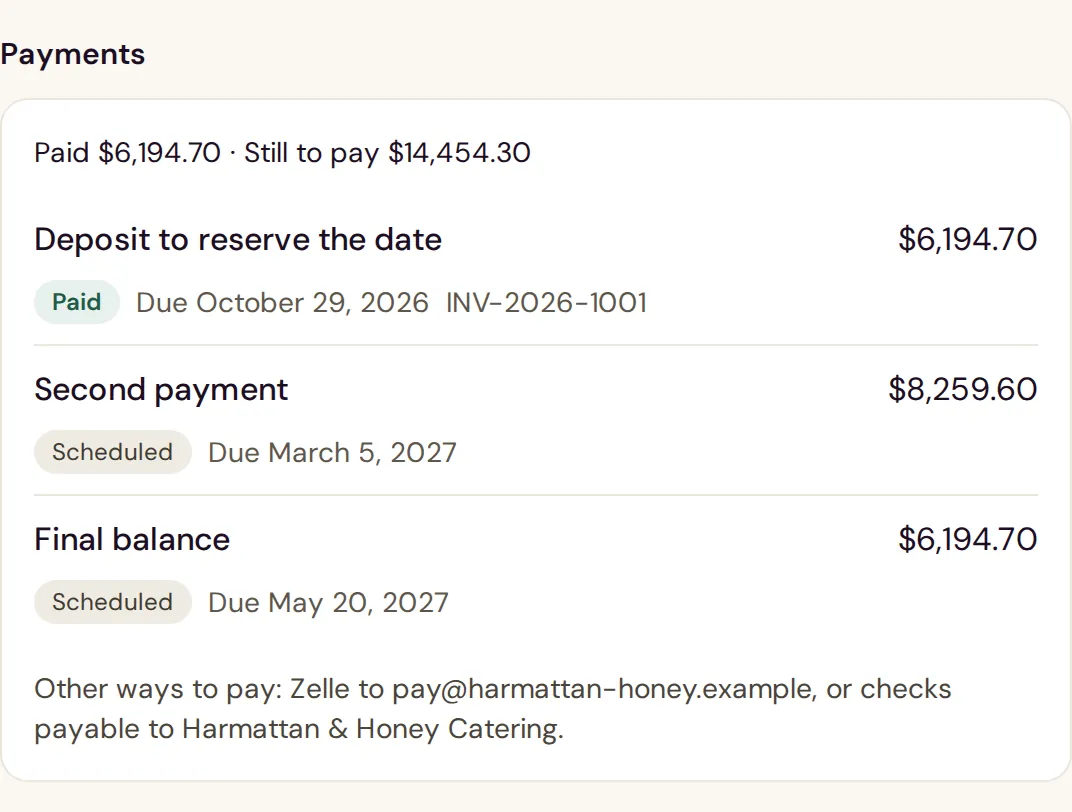
On your event page, Payments shows what you've paid and what's still to pay, with each payment's due date and invoice number.
Who gets emailed
- You, a receipt when your payment is recorded, called Payment received.
- You, a refund receipt if your caterer refunds you, with the reason.
What you'll see when it worked
On your event page, the payment shows as paid.
If something goes wrong
| What you see | What to do |
|---|---|
| This invoice can't be paid online | It may already be paid, or your caterer withdrew it. Contact your caterer. |
| This link can't be used | The link isn't valid or has expired. Ask your caterer for a new one. |
| The payment page didn't open. Please try again. | Try again in a moment. |
Be careful
- Use the newest invoice email from your caterer: if they send it again, an older link may stop working.